> ## Documentation Index
> Fetch the complete documentation index at: https://docs.hedwik.io/llms.txt
> Use this file to discover all available pages before exploring further.
# Left Sidebar / Navigation
> Configure and customize the left sidebar navigation system in Skalven.
## **1. Left Sidebar Contents**
The left sidebar contains:
* **Brand**
* Logo
* Search Button
* **Navigation**
* **Action Buttons**
* Sign In / Sign Up / Account / Upgrade
***
## **2. Setting the Logo**
Skalven includes a dedicated and detailed guide for customizing the logo.\
Please refer to:\
[**Logo Customization Guide**](/skalven/customization/logo)
***
## **3. Configuring Navigation in the Left Sidebar**
The left sidebar navigation is one of the core structural elements of Skalven.\
It supports:
* Navigation item grouping
* Section titles
* Dividers
* Custom icons
* Automatic icon matching
Below are all navigation configuration options.
***
### **3.1 Adding a Navigation Item**
1. Open **Settings → Navigation**.
2. Add a new item under **Primary Navigation** with a label and URL.
3. Save your changes.
Your new menu item will automatically appear in the left sidebar.
***
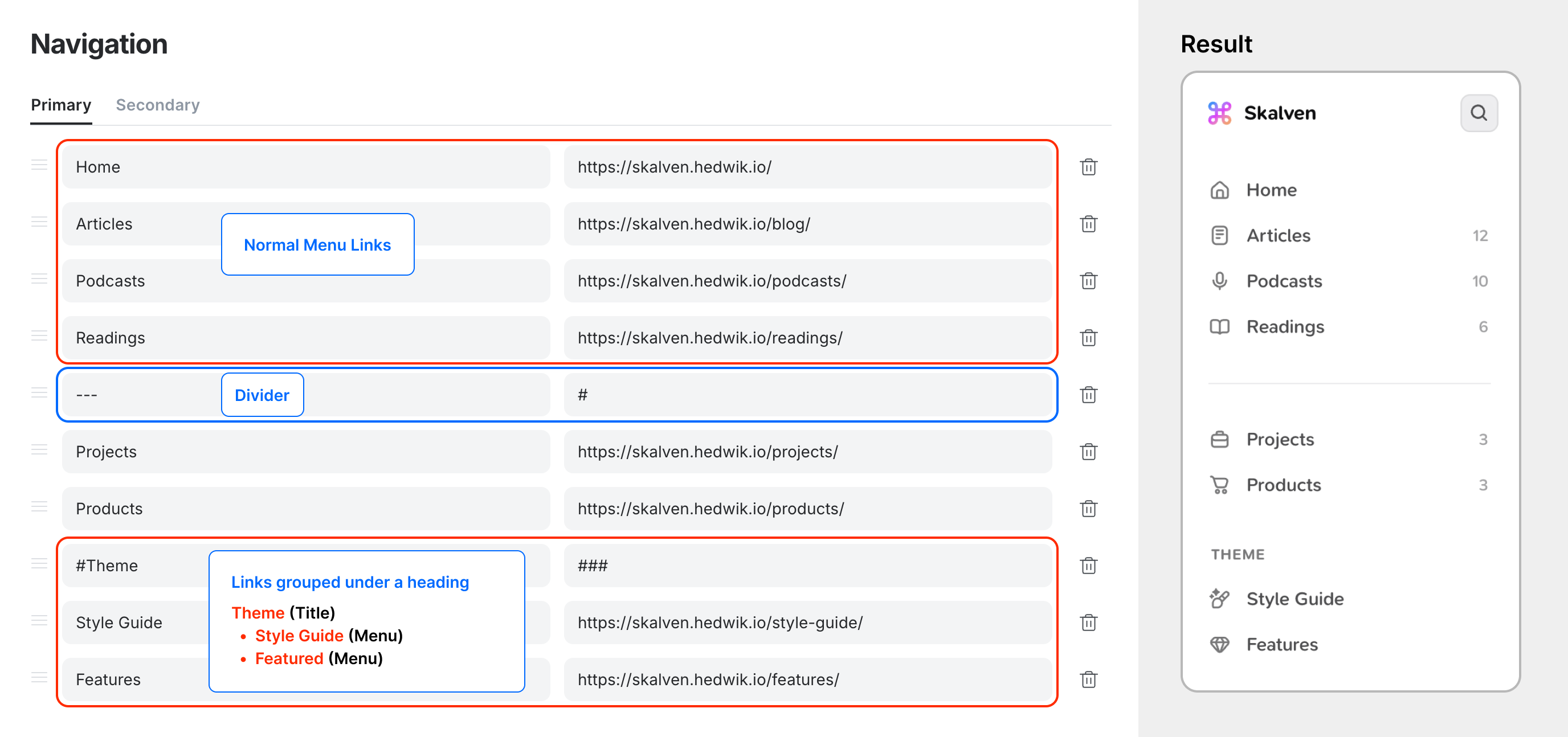
### **3.2 Adding Section Titles to Navigation**
Section titles help organize your menu visually.
1. Open **Settings → Navigation**.
2. Add a new item with a label starting with **`#menutitle`**
3. Leave the URL field or add **###**
4. All navigation items listed below this title—until the next one—will be grouped under it.
Example structure:
 ***
### **3.3 Adding Dividers Between Navigation Items**
1. Open **Settings → Navigation**.
2. Add a new item with the label **`---`**.
3. Leave the URL field empty.
4. This will add a visual divider separating menu sections.
***
### **3.4 Adding Custom Icons to Navigation Items**
Skalven supports custom icons via a helper function.
1. Open **Settings → Navigation** and create your menu items.
2. Check the **URL slug** used for the navigation link.\
For example:
* `/donate/` → slug: `donate`
* `/gift/` → slug: `gift`
3. Open **Settings → Code Injection** → *Site Footer*.
4. Add the script shown in for a single icon
```
```
or multiple
```
```
5. **If you’d like to add icons to external links:**
```
```
Icons for external links match by **menu label**, not by the menu ~~URL~~!
In short: use `HedwikNavIcons.addNavIcon` for internal links, and `HedwikNavIcons.addNavIconLabel `for external links!
6. Save your changes.
***
### **3.5 Supported Built-In Icons for Navigation Menus**
Skalven includes a large set of preconfigured icon keywords.\
These automatically apply icons to navigation items.
```
- home
- podcasts, podcast, audio
- blog, article, writing, writings, posts, drafts
- tag, tags, category, categories
- author, authors, writers, editors, users
- style, style-guide, style guide, design
- features, feature
- plans, plan, membership, memberships
- read, reads, reading, readings, book, books, bookshielf, my-readings
- work, works, projects, project
- contact, message
- hi, hello, welcome
- learn, course, guide, guides
- link, links
- news, newsletter, inbox
- recommendation, recommendations, tools, toolbox
- bookmark, bookmarks
- about, about-us
- error, error-404, errors, fail
- rss, rss-feed
- subscribe
- ad, ads, advertise
- idea, ideas
- tip, tips
- store, stores, product, products, goods
- code, coding
- develop, development, developments
- donate, donates
- community, group
- music, musics, listen
- photography, photos, gallery, snapshots, visuals
- quote, quotes, reflections
- travel, journey, trip
- archive, archives
- life, lifestyle, moments
- tech, technology, innovation
- ai, artificial-intelligence, artificial, intelligence
- privacy, privacy-policy
- gaming, game
- terms, term, terms-and-conditions, terms-conditions
- faq, question, questions, frequently-asked-question, frequently-asked-questions
- page, pages, note, notes
- edu, education, educations, school, schools
- gift, gifts, discount, discounts
- signin, sign-in, login
- register, sign-up, signup
```
***
### **3.3 Adding Dividers Between Navigation Items**
1. Open **Settings → Navigation**.
2. Add a new item with the label **`---`**.
3. Leave the URL field empty.
4. This will add a visual divider separating menu sections.
***
### **3.4 Adding Custom Icons to Navigation Items**
Skalven supports custom icons via a helper function.
1. Open **Settings → Navigation** and create your menu items.
2. Check the **URL slug** used for the navigation link.\
For example:
* `/donate/` → slug: `donate`
* `/gift/` → slug: `gift`
3. Open **Settings → Code Injection** → *Site Footer*.
4. Add the script shown in for a single icon
```
```
or multiple
```
```
5. **If you’d like to add icons to external links:**
```
```
Icons for external links match by **menu label**, not by the menu ~~URL~~!
In short: use `HedwikNavIcons.addNavIcon` for internal links, and `HedwikNavIcons.addNavIconLabel `for external links!
6. Save your changes.
***
### **3.5 Supported Built-In Icons for Navigation Menus**
Skalven includes a large set of preconfigured icon keywords.\
These automatically apply icons to navigation items.
```
- home
- podcasts, podcast, audio
- blog, article, writing, writings, posts, drafts
- tag, tags, category, categories
- author, authors, writers, editors, users
- style, style-guide, style guide, design
- features, feature
- plans, plan, membership, memberships
- read, reads, reading, readings, book, books, bookshielf, my-readings
- work, works, projects, project
- contact, message
- hi, hello, welcome
- learn, course, guide, guides
- link, links
- news, newsletter, inbox
- recommendation, recommendations, tools, toolbox
- bookmark, bookmarks
- about, about-us
- error, error-404, errors, fail
- rss, rss-feed
- subscribe
- ad, ads, advertise
- idea, ideas
- tip, tips
- store, stores, product, products, goods
- code, coding
- develop, development, developments
- donate, donates
- community, group
- music, musics, listen
- photography, photos, gallery, snapshots, visuals
- quote, quotes, reflections
- travel, journey, trip
- archive, archives
- life, lifestyle, moments
- tech, technology, innovation
- ai, artificial-intelligence, artificial, intelligence
- privacy, privacy-policy
- gaming, game
- terms, term, terms-and-conditions, terms-conditions
- faq, question, questions, frequently-asked-question, frequently-asked-questions
- page, pages, note, notes
- edu, education, educations, school, schools
- gift, gifts, discount, discounts
- signin, sign-in, login
- register, sign-up, signup
```