> ## Documentation Index
> Fetch the complete documentation index at: https://docs.hedwik.io/llms.txt
> Use this file to discover all available pages before exploring further.
# Social Accounts
> Manage all your social media links in one place. This page explains how Skalven handles social platforms, how to add your accounts using the @platform format, and where these links appear in the theme. With support for 38 platforms, you can easily connect your online presence to your site’s cover and showcase your profiles effortlessly.
## **1. Social Accounts Overview**
In the Skalven theme, social media links appear by default only on the cover area due to the theme’s structure.
We support a total of 38 social media platforms. You can view the full list [here](#3-supported-social-media-accounts).
***
## **2. Configuring Social Accounts**
Since **Facebook** and **Twitter/X** are natively supported in Ghost, you should configure these accounts through **Settings** > **Social accounts**.
**Setting up your additional social media accounts in the Skalven theme is very easy. Just follow the steps below:**
1. Go to **Settings** and open the **Navigation** section.
2. Switch to the **Secondary** navigation tab.
3. Add the social media platform you want to use by writing its name with the **@symbol** in front (for example: `@facebook`).
4. In the **URL field** next to it, enter your **full social media** profile link. `https://facebook.com/your-id`
5. Save your changes.
**Example:**
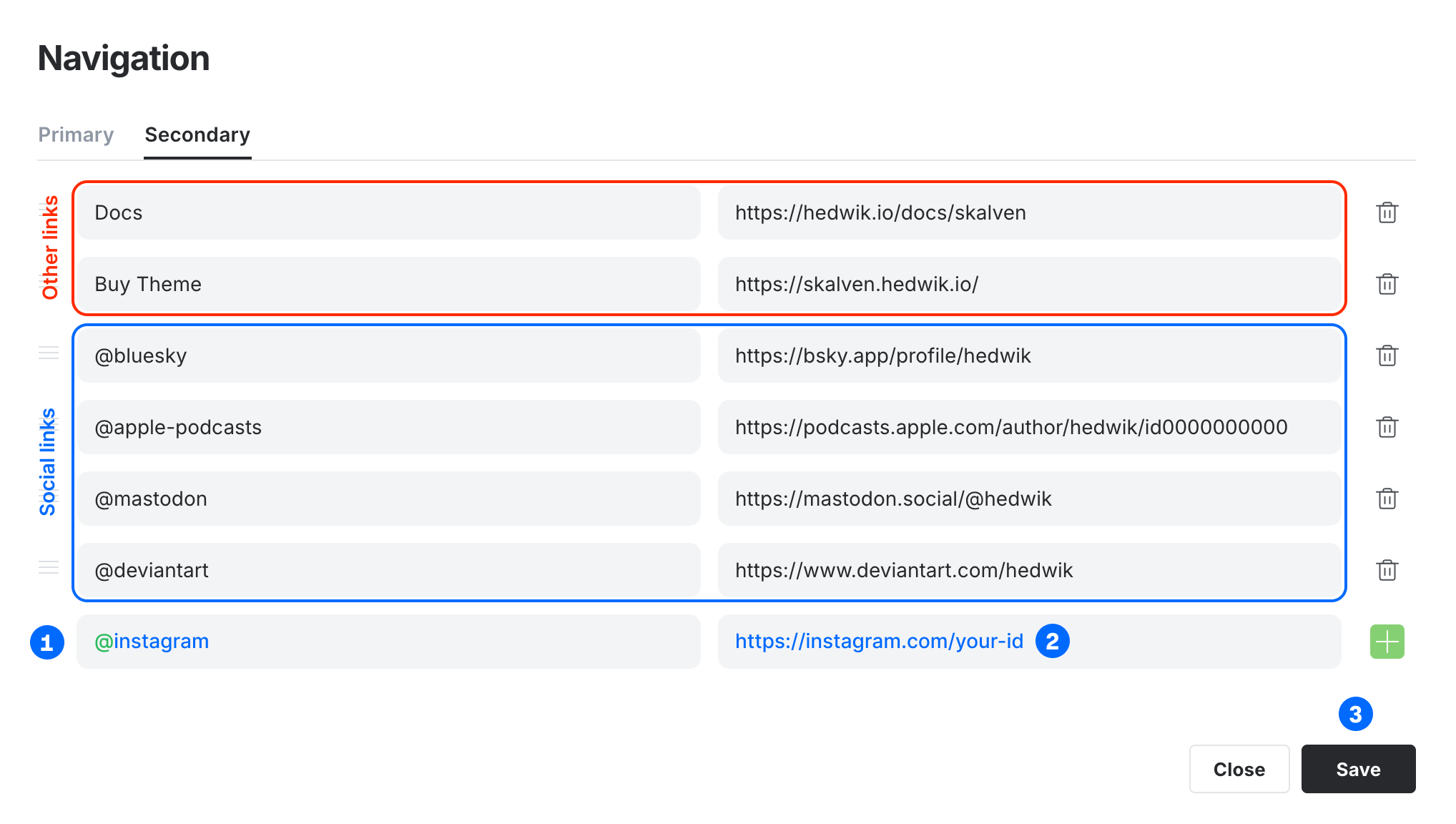 In the secondary navigation, any link that does not start with the @ symbol will appear in the footer links area located in the right sidebar.
***
## **3. Supported Social Media Accounts**
For all supported platforms and the correct usage of each social media name, please refer to the list below.
```
@instagram
@youtube
@linkedin
@github
@tiktok
@reddit
@mastodon
@threads
@medium
@pinterest
@telegram
@discord
@behance
@dribbble
@spotify
@bluesky
@slack
@twitch
@whatsapp
@deviantart
@patreon
@apple-podcasts
@snapchat
@substack
@tumblr
@overcast
@castbox
@pocket-casts
@castro
@buymeacoffee
@gumroad
@devto
@product-hunt
@codepen
@figma
@framer
```
In the secondary navigation, any link that does not start with the @ symbol will appear in the footer links area located in the right sidebar.
***
## **3. Supported Social Media Accounts**
For all supported platforms and the correct usage of each social media name, please refer to the list below.
```
@instagram
@youtube
@linkedin
@github
@tiktok
@reddit
@mastodon
@threads
@medium
@pinterest
@telegram
@discord
@behance
@dribbble
@spotify
@bluesky
@slack
@twitch
@whatsapp
@deviantart
@patreon
@apple-podcasts
@snapchat
@substack
@tumblr
@overcast
@castbox
@pocket-casts
@castro
@buymeacoffee
@gumroad
@devto
@product-hunt
@codepen
@figma
@framer
```